GeoCities.us
» SiliconValley » Heights
|
GeoCities.us
» SiliconValley » Heights |
Get your FREE home page! |
 |


CHESTER'S COMPUTER MUSEUM 31 Old Computers and Counting Founded 1993 in a spare bedroom in Albuquerque, New Mexico · Admission free |
|
> RUN MUSEUM CHESTER'S COMPUTER MUSEUM LOCATION: THE SPARE BEDROOM COMPUTERS ON THE SHELVES: 31 OLDEST: ALTAIR 8800 (1975) CURATOR: C. CUTSHALL HOUSE RULE: ONE IN, ONE OUT TIMES RULE BROKEN: 30 >_ |
|
[ The Museum | The Collection | The Altair | Restoration Tips | Finding Old Computers | Want List | Mitchell's Corner ] Take the tour. Click a snapshot to jump to it.
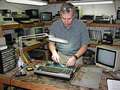
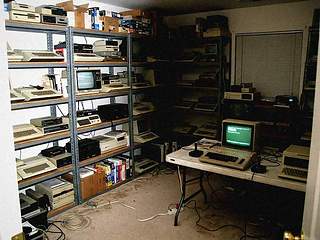
Welcome! My name is Chester Cutshall. I'm 45, and I teach electronics at a public high school here in Albuquerque, which means I spend my days explaining Ohm's law to sixteen-year-olds and my evenings and weekends in a spare bedroom full of old computers. My family calls that room the Museum. This is its home page. It started with a mistake. In 1978, with savings from my first teaching job, I walked into Radio Shack and bought a brand-new TRS-80 Model I. I learned more from that machine in one year than I did in four years of college. (Please don't tell my college.) Then in 1984 I sold it to buy an IBM PC clone, because everybody said that was where things were headed, and I have regretted it ever since. The clone was faster, I'll grant you. But it never felt like mine. Nine years later, in 1993, I was poking through a garage sale on a Saturday morning, and there on a card table between a fondue pot and a box of shoes was a TRS-80 Model I, the very same model I'd owned. Ten dollars. I paid the man, carried it to the car, sat in the driveway and grinned. I had my old friend back, more or less. Then a second computer turned up, and a third, and you can probably see where this is going. Today there are 31 computers in the Museum, lined up on gray steel shelving along the walls, with boxes of manuals and cassettes and floppy disks stacked wherever there's room. The guest bed moved out in 1995, and our guests haven't been back since. I'm told those two facts are related. My wife, Sandra, is a nurse and a very patient woman, and she has exactly one rule about the Museum: nothing new comes in unless something goes out. It's a good rule. It's a fair rule. By my count it has been broken thirty times. I keep careful records, which may be the problem. This March I finally bought one of the new digital cameras, the kind that saves the pictures right onto an ordinary floppy disk, so I could photograph the whole collection for the insurance company. Once I had the pictures, it seemed a shame not to put them on the Web for the rest of you. So here we are. The very first picture I took with it is the one below.
Here is the inventory, the same list the insurance company has, minus my commentary. "Came out" is the year the machine first went on sale. Where I don't have that year from the machine's own paperwork yet, I've put "early '80s" rather than guess. A collector's page is no place for guessing.
"Yes" means it boots up and does everything it did the day it was new. "Partly" means it powers up and that's as far as we've gotten. "Not yet" means it's next in line on the bench. Paid for all 31 together, by my notebook: $361. That is less than one Altair kit cost in 1975, which is my argument. Sandra's argument is that 1975 was a long time ago.
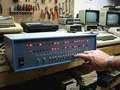
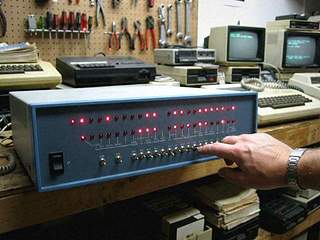
If the Museum has a crown jewel, this is it, and it's a hometown story. The Altair 8800 was built right here in Albuquerque, by a company called MITS, starting in 1975. It was on the cover of Popular Electronics in January 1975, and you could buy it as a kit for $397. Inside is an Intel 8080. What it doesn't have is a keyboard or a screen. You program it by flipping the toggle switches on the front panel, and you read the answer in the rows of red lights. This is the computer that started it all, and it started it right here in town.
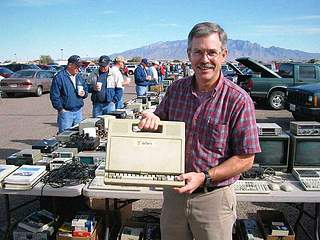
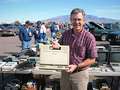
I found mine in October of 1998 at a hamfest, the swap meet the radio and electronics folks hold in the fairgrounds parking lot. Under a table, in a cardboard box marked MISC, behind a tangle of cable and a coffee can of knobs, was a wide, low metal box with a row of switches across the front. I knew what it was before I had it halfway out of the box, and I had to stand there a minute and act natural. The seller was an old engineer cleaning out his garage. He wanted seventy-five dollars. I did not haggle. I'm told that is a mistake at a hamfest, and I don't care one bit. Over the winter I went through it on the bench in the garage. The big trouble was in the power supply, where the capacitors had dried out after all those years. I replaced them, checked everything twice, and then checked it again. The first time the front panel lit up, I hollered loud enough that Sandra came out to see who'd gotten hurt. Now it runs a little program that I toggle in by hand, one switch at a time, which adds two numbers together and shows the sum in the lights. That's it. That's the whole show. It takes me a few minutes to put in and the Altair no time at all to run, and every time it works I grin like a fool. My students think a computer that can't even show you a letter is the saddest thing they've ever seen, right up until I let them flip the switches themselves.
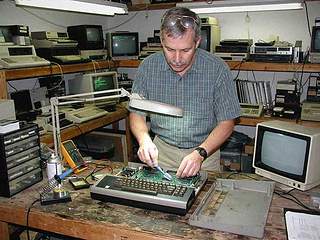
1. Never plug in an old machine you haven't checked. I know. You want to see if it works. Don't. Open it up and look first, for anything burnt, cracked, leaking or bulging, for screws rattling around loose, and for mouse nests. (I have found two.) Check the power supply first, because a bad power supply can take the rest of the computer down with it. 2. Suspect the old capacitors. The electrolytic capacitors, the little cans in the power supply, dry out with age. That's what was wrong with my Altair. If one has bulged on top or leaked, replace it, and on a machine twenty years old, think about replacing them all. Use the same value and at least the same voltage rating, and mind which way they go in. They have a plus side and a minus side, and they don't forgive you for getting it backwards. 3. Leave the inside of the monitor alone. The picture tube in a monitor can hold a dangerous charge long after it's been unplugged. Unless you've been trained to work on them, don't. I give this speech to every class, every fall, and I'll give it to you too. 4. Cleaning keyboards. Before you pull off a single key, draw a map of the layout, or nowadays, take a picture of it. Wash the keys in warm water with a little dish soap and let them dry overnight on a towel. Clean the board with rubbing alcohol and a soft brush. An old toothbrush is perfect, as long as it's an old one. Let everything dry all the way before power goes anywhere near it. 5. Storing cassettes and floppies. Keep them in their cases, standing on edge like books, somewhere cool and dry, and away from magnets, which means away from speakers and the backs of monitors and TV sets. Never leave them in the car. In Albuquerque in July, a car is an oven, and a cassette in an oven is a pretzel. If a tape matters to you, copy it while it still loads. 6. Keep a notebook. Write down what you did, what you replaced and where you got the parts. I keep a spiral notebook for every machine in the Museum. In ten years you won't remember, and the next fellow will want to know.
Old computers are everywhere this year, if you know where to look, and most of them are on their way to the dump. Here's where mine came from:
The Osborne is number 31, the thirtieth time Sandra's rule has been broken. When I carried it in, she asked what was going out. I offered a box of old cables. She said cables don't count.
Everybody at school keeps asking whether the Museum is ready for Y2K. Most of my computers don't know what year it is at all, and they're happier for it. On New Year's Day I plan to toggle a sum into the Altair and see if it still adds. I have a feeling it will.
Sandra has asked me to make clear that this list is for entertainment purposes only.
If one of these is sitting in your closet, write me. I'll pay fair, I'll come get it, and it will have a good home with thirty-one friends.
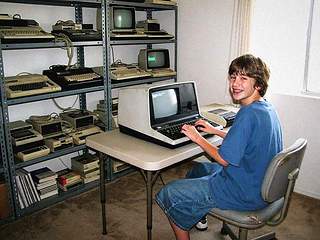
Our son Mitchell is 13. He'd rather play video games than restore anything, but he's coming around. I gave him his own corner of the page and promised not to change a word except the spelling.
Sandra reads every word of this page before it goes up, and she asked for exactly one line of her own. Here it is, as delivered: Point taken, dear. | ||||||||||||||||||||||||||||||||||||||||||||||||||||||||||||||||||||||||||||||||||||||
Visitors to the Museum since March 1999:    Questions, old computers, or a closet you'd like cleaned out? 
 Last updated Saturday, September 25, 1999 |

 People write and ask how to get started fixing up an old computer. I teach this for a living, so you're
going to get it as a numbered list. There will not be a quiz.